Why an 8kbps VoIP Codec Costs 24–31kbps on the Wire
12 September 2026
Why an 8kbps VoIP Codec Costs 24–31kbps on the Wire
A VoIP codec compresses speech into digital packets for transmission, then decompresses it at the other end, and the codec you pick decides most of what your calls actually sound like. As a working rule, use Opus for modern IP-to-IP calls, G.711 for PSTN interconnect, G.722 for HD desk-phone paths, and reserve G.729 for genuinely constrained links. Remember that on-wire bandwidth always includes RTP/UDP/IP headers, and quality is measured through the Mean Opinion Score (MOS), not raw bitrate alone.
TL;DR:
- Bandwidth overhead from headers can nearly triple on-wire data for highly compressed codecs like G.729, making it less bandwidth-efficient in practice.
- Prioritizing Opus first, G.722 second, G.711 third, and G.729 only if bandwidth is constrained can optimize call quality and network capacity.
- Proper network setup, including VLAN separation and QoS tagging, significantly improves call quality more than codec choice alone.
- Transcoding between codecs at session border controllers increases latency and CPU load, so consistent codec policy reduces operational complexity.
- Licensing for codecs like G.729 has expired, and Opus is a royalty-free standard, simplifying legal considerations for deployment.
Table of Contents
- How do VoIP codecs actually work?
- Common VoIP codecs compared: which one fits your call?
- Bandwidth, overhead and capacity planning for real networks
- How do you choose the right codec in practice?
- Fixing poor call quality: QoS, jitter buffers and practical tests
- Essex Telephone Systems’ approach to codec policy and support
- Licensing and royalty considerations for proprietary codecs
- Compatibility and interoperability issues between vendors
- Why the codec conversation misses the point
- Get your VoIP codec policy right the first time
- Sources
- FAQ
How do VoIP codecs actually work?
Every codec does four jobs: it samples the analogue voice signal, quantises it into bits, compresses that data, then wraps it into packets for the network. Each stage carries a trade-off, and understanding them explains why two codecs with similar bitrates can sound completely different.
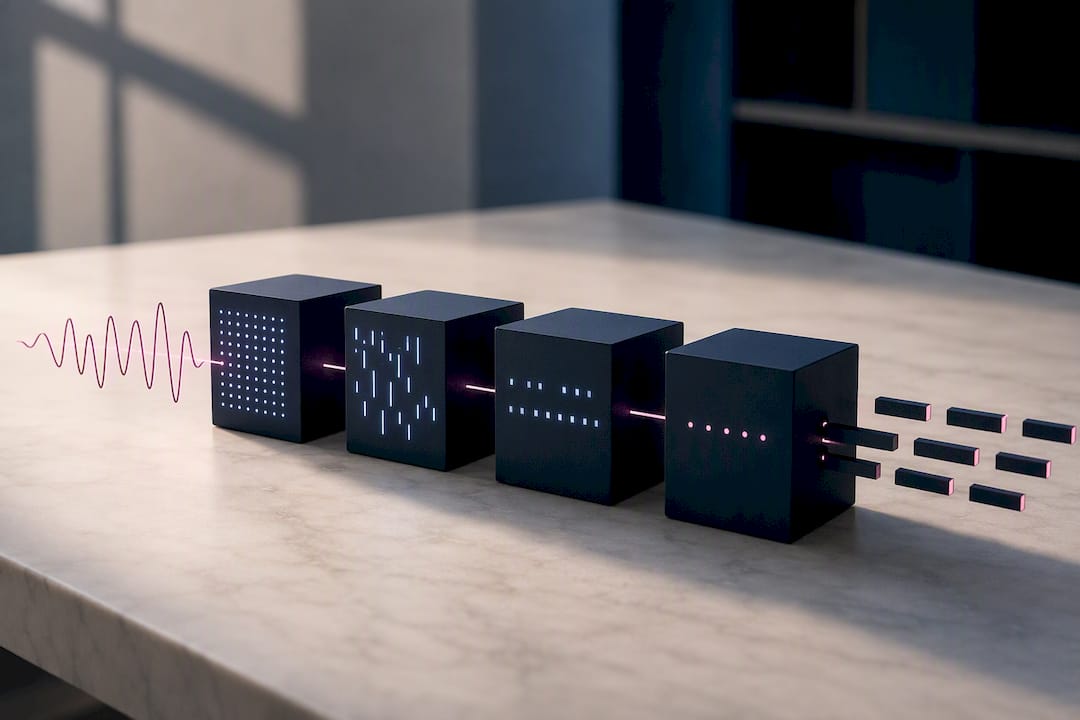
Sampling rate sets the audio band. Narrowband codecs like G.711 sample at 8 kHz, capturing roughly 300Hz to 3.4kHz, which is why traditional phone calls sound thin and slightly nasal. Wideband codecs such as G.722 sample at 16 kHz, extending the range up to around 7kHz, which is the difference between a call that sounds like it’s coming through a tin can and one that sounds like the person is in the room. Opus can sample as high as 48kHz for full-band audio, matching near-CD quality when both endpoints support it.
Bitrate and algorithmic delay pull against each other. Compressing audio harder to save bandwidth generally means the codec needs more processing time and a bigger “look-ahead” window to predict the next chunk of speech, which adds latency and CPU load. G.729’s aggressive 8kbps compression is a good example: it saves bandwidth but its silence suppression and prediction algorithms tax the processor more than G.711’s simple encoding does.
Then there’s the gap between codec bitrate and what actually crosses the network. Every voice packet carries payload plus IP, UDP, and RTP headers, and that overhead does not shrink just because the codec is efficient. A codec quoted at 8kbps can end up costing three or four times that once headers are counted, which matters enormously in the bandwidth and capacity planning further down this page.
A few terms come up constantly in codec discussions and are worth knowing cold:
- VBR (Variable Bit Rate): the codec adjusts its output rate based on how complex the audio is, saving bandwidth during quieter speech.
- CBR (Constant Bit Rate): output stays fixed regardless of content, simpler to plan for but less efficient.
- FEC (Forward Error Correction): extra redundant data sent alongside the payload so the receiver can reconstruct lost packets without asking for a retransmission.
- PLC (Packet Loss Concealment): the receiving end fills small gaps from lost packets by estimating what the missing audio probably sounded like.
- Frame size: how many milliseconds of audio go into each packet, typically 10 to 30 milliseconds in telephony. Shorter frames cut delay but send more packets, which means more header overhead per second of audio.
Common VoIP codecs compared: which one fits your call?
Five codecs cover almost every real deployment you’ll encounter, and each was built for a different network reality. Here’s how they stack up on the numbers that actually matter for planning.
| Codec | Sample rate | Nominal bitrate | Typical MOS | Best suited to |
|---|---|---|---|---|
| G.711 | 8kHz (narrowband) | 64kbps | Around 4.2, toll quality | PSTN interconnect, legacy gateways, fax passthrough |
| G.722 | 16kHz (wideband) | 48 to 64kbps | Noticeably above G.711 for clarity | HD desk phones on LAN, internal calls |
| G.729 | 8kHz (narrowband) | 8kbps | Lower than G.711, acceptable not excellent | Bandwidth-constrained WAN links, satellite, older SIP trunks |
| Opus | 8 to 48kHz (adaptive) | commonly used at 24 to 32 kilobits per second | Around 4.5 at 32kbps in test conditions | WebRTC, softphones, modern SIP trunks, mobile apps |
| AMR-WB/EVS | 16kHz+ (wideband/super-wideband) | Variable, adaptive | Comparable to or better than G.722 | Mobile VoLTE, carrier networks with 4G/5G backhaul |
The comprehensive per-codec breakdown from VoIPmonitor is worth bookmarking if you deal with SIP trace analysis regularly, since it covers sampling and bitrate specifics for the full family including older codecs like iLBC and Speex, both of which have largely fallen out of favour for new deployments.
A few practical notes that don’t fit neatly into a table:
- G.711 remains the safest bet for fax and in-band DTMF because compressed codecs like G.729 can corrupt these signals, forcing you to rely on out-of-band methods like RFC 2833 instead.
- Opus at moderate bitrates such as 24 to 32kbps delivers higher MOS than G.711 and comfortably beats G.729 at equivalent wire bandwidth, largely thanks to its built-in FEC and adaptive bitrate modes.
- WebRTC standards require browsers to support Opus and G.711, which is why Opus has become the default on nearly every browser-based calling platform.
- Independent benchmark comparisons put G.711 around MOS 4.2 and Opus at 32kbps around MOS 4.5, a meaningful gap given how coarse the MOS scale is.
If you had to boil this down to a default priority order, most modern deployments should try Opus first, fall back to G.722 for wideband desk phones that don’t support Opus, use G.711 wherever PSTN interconnect is involved, and keep G.729 in reserve purely for links where bandwidth is genuinely scarce.
Bandwidth, overhead and capacity planning for real networks
Codec bitrate is not the number you should be sizing your network against. Every RTP packet gets wrapped in UDP and IP headers, adding roughly 40 bytes of overhead per packet regardless of how small the payload is.
That overhead disproportionately punishes highly compressed codecs. G.729’s 8kbps payload sounds tiny until you add headers, at which point it typically lands closer to 24 to 31kbps per call on the wire. G.711 at 64kbps payload ends up nearer 80 to 87kbps once headers and Layer 2 framing are included. Opus sits somewhere in between depending on the bitrate mode chosen, but the same 40-byte tax applies regardless of codec.
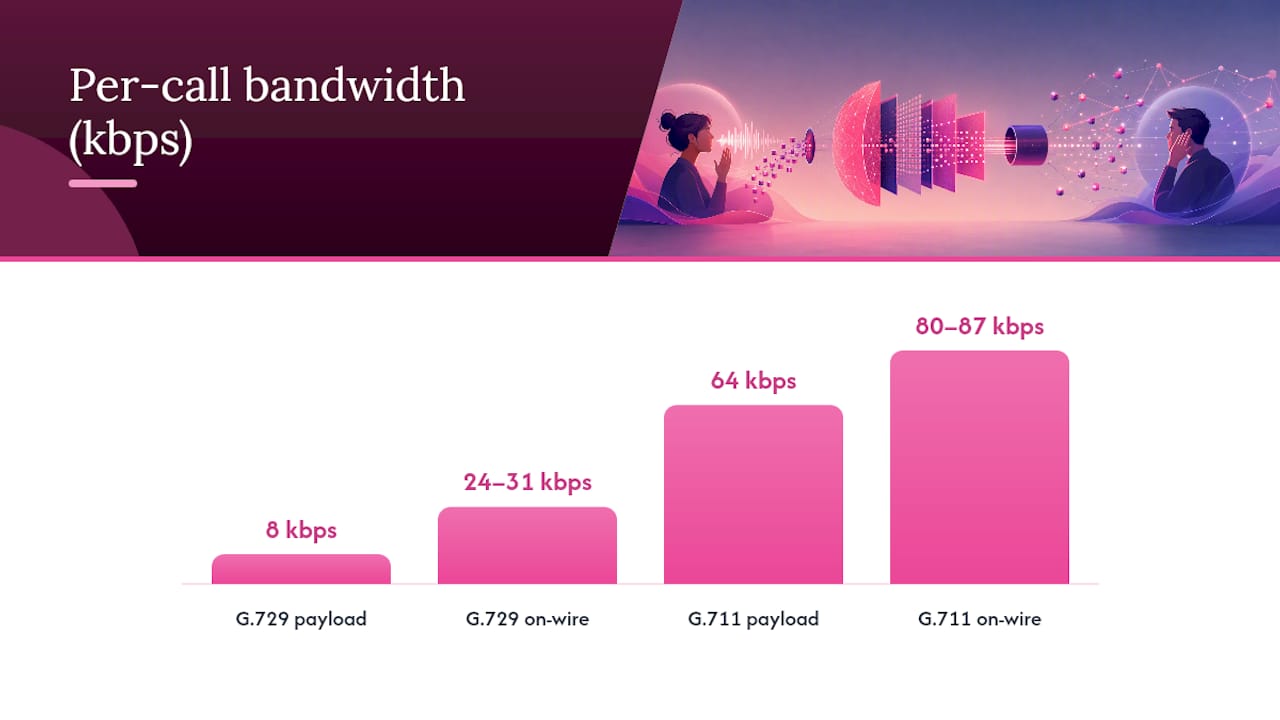
Pro Tip: Never quote a client or a network diagram in “codec bitrate” alone. Always state the on-wire figure, because that’s the number your switch, router, and internet connection actually have to carry.
Header compression, known as cRTP, strips down that 40-byte overhead on point-to-point links, which can genuinely help on slow WAN circuits. It adds processing overhead on every hop, though, and most modern networks with adequate bandwidth simply don’t need the complexity it introduces.
A worked example makes the planning implication concrete. Fifty concurrent G.711 calls at roughly 87kbps each need close to 4.35Mbps of dedicated capacity, not counting video, email, or other traffic sharing the same link. Switch those same 50 calls to Opus at a sensible 32kbps mode and total-on-wire bandwidth including overhead drops to somewhere around 2 to 2.5Mbps, a substantial saving that changes what size trunk or leased line you actually need.
Sizing considerations differ sharply by connection type:
- On modern fibre or a dedicated leased line, bandwidth headroom is rarely the binding constraint, so codec choice becomes more about quality than capacity.
- On constrained WAN links, satellite backhaul, or older broadband connections, every kilobit matters and G.729 or a lower Opus bitrate mode earns its place.
- Understanding how network bandwidth actually behaves under load helps explain why a link that looks fine on paper still chokes under real call volume, particularly when other traffic competes for the same pipe.
How do you choose the right codec in practice?
Most VoIP systems negotiate codecs automatically during call setup, and for the vast majority of businesses that’s exactly how it should stay. Manual codec forcing is a tool for edge cases, not a default policy.
- Let auto-negotiation lead. Modern PBXs and SIP trunks handle codec selection well on their own, and forcing a specific codec should be the exception rather than the rule, reserved for legacy hardware or genuinely constrained links.
- Set a sensible priority order. Opus first where both endpoints support it, G.722 for internal wideband calls, G.711 for anything touching the PSTN, G.729 only where bandwidth genuinely won’t stretch further.
- Watch what your SBC is doing. Every time a session border controller has to transcode between codecs on different legs of a call, it adds CPU load and latency. Standardising codec policy per trunk reduces how often that happens.
- Flag interoperability red flags early. Older SIP trunks that only support G.711, mobile carriers pushing AMR-WB, and desk phones with outdated firmware are the usual sources of mid-call renegotiation failures or one-way audio.
- Retire legacy codecs deliberately. G.723.1, iLBC, and Speex still show up in old configuration templates, but they add operational debt without a real quality benefit for new deployments.
Pro Tip: If you’re rolling out AI-driven call handling or a modern softphone platform, check Opus support first. Systems built around AI-powered call handling tend to default to Opus because it copes far better with variable mobile and Wi-Fi connections than legacy narrowband codecs.
Fixing poor call quality: QoS, jitter buffers and practical tests
Codec choice sets the ceiling on quality, but network configuration decides whether you ever get close to it. A well-tuned network running G.711 will usually beat a poorly configured one running Opus.
Start with the physical and network layer. Put voice traffic on its own VLAN, apply DSCP tagging so routers and switches prioritise it over bulk data, and use wired connections for desk phones wherever possible since Wi-Fi introduces variable jitter that no codec fully compensates for.
On the endpoint side, jitter buffer sizing matters more than most engineers assume. Too small and you get audible gaps during network variance; too large and you introduce noticeable delay that makes conversation feel stilted. Pair that with FEC and PLC settings appropriate to your chosen codec, and pick frame sizes that balance delay against packet overhead.
A basic troubleshooting checklist covers most real-world problems:
- Pull MOS, packet loss, and jitter statistics from your SBC or monitoring platform rather than guessing from user complaints alone.
- Run controlled test calls before and after any codec policy change to confirm the change actually helped.
- Check for asymmetric routing or firewall issues if calls connect but audio only flows one way.
- Escalate to your provider or installer when packet loss consistently exceeds 1% or jitter exceeds 30ms, since that usually points to a network issue beyond codec tuning.
Pro Tip: Validate every codec policy change with a real test call before rolling it out fleet-wide. A configuration that looks correct on paper can still behave unpredictably once actual traffic and real-world jitter hit it.
Essex Telephone Systems’ approach to codec policy and support
Getting codec selection right is only half the job. Essex Telephone Systems handles the installation, network assessment, and ongoing VoIP policy work that turns the right codec choice into consistently good call quality across a business’s whole estate.
UK-based support matters here because codec and jitter problems are often intermittent, tied to specific times of day or specific network segments, and they need someone who can look at real traffic quickly rather than working through a script. When call quality issues persist despite sensible codec settings, an on-site network assessment usually finds the actual bottleneck faster than remote troubleshooting alone. Hardware such as the Mobe XTouch T10 desk phone reflects the kind of field-tested endpoint that supports wideband codecs properly out of the box, rather than needing manual configuration to unlock HD audio.
Licensing and royalty considerations for proprietary codecs
Not every codec is free to deploy without paying for it, and this matters more than most buying guides admit. G.711, G.722, and G.729 are all standardised by the ITU-T, and while G.729 historically carried patent licensing requirements from its originating consortium, those patents have now expired, making it freely implementable. Opus, by contrast, was designed from the outset as a royalty-free, open standard defined in RFC 6716, with no licensing fee attached to using it in any product.
The practical risk sits with older or more obscure proprietary codecs bundled into some vendor hardware or software, where licensing terms can be buried in end-user agreements few people read closely. AMR-WB, widely used in mobile networks, involves licensing arrangements handled at the carrier and chipset levels, which are largely invisible to a business buying desk phones but relevant to anyone building embedded VoIP hardware from scratch.
For a business simply choosing a phone system, this rarely becomes a direct cost, since PBX and SIP trunk vendors absorb any licensing into their product pricing. It’s still worth asking a provider directly whether their platform’s codec support carries any licensing dependency, particularly if you’re planning to run software-based endpoints or open-source PBX platforms where the licensing burden shifts to whoever deploys the software.
Compatibility and interoperability issues between vendors
Codec names are standardised, but implementations are not always identical, and that gap causes more real-world call failures than the codec choice itself. Two vendors can both claim “G.729 support” while implementing slightly different silence suppression, packet loss concealment, or negotiation behaviour, and the result is often a call that connects but sounds subtly wrong or drops audio intermittently.
SIP trunk providers and PBX vendors sometimes support different subsets of Opus’s configuration options, since Opus allows variable frame sizes, bitrate modes, and stereo or mono operation, and not every implementation exposes or negotiates all of them the same way. This is a common source of one-way audio or failed calls when connecting a modern IP-PBX to an older SIP trunk that only partially implements the codec it claims to support.
The safest interoperability strategy is keeping G.711 as a guaranteed fallback on every trunk and endpoint, since it’s the one codec virtually every VoIP system implements identically. When a call fails to negotiate a preferred codec, falling back cleanly to G.711 avoids the dropped calls and silent failures that come from two systems disagreeing on the finer details of a more complex codec’s negotiation handshake. Testing new hardware or trunk providers with real test calls before full rollout catches these mismatches long before they become a support headache.
Why the codec conversation misses the point
Most guides to this topic turn into codec museums: a long parade of every standard ever ratified by the ITU, in chronological order, with equal weight given to codecs nobody should deploy in 2026. That’s not useful. The judgement that actually matters is narrower: pick Opus or G.711 as your working defaults, understand why header overhead changes your bandwidth maths, and stop there unless a specific constraint forces otherwise.
The conventional advice oversells codec choice as the lever that fixes call quality. It isn’t. A badly configured network running G.711 will consistently sound worse than a well-tuned one running G.729, because jitter, packet loss, and QoS misconfiguration do more damage than codec selection ever will. Prioritise the network fundamentals first, then treat codec choice as the fine-tuning step it actually is.
What gets underrated is transcoding cost. Every SBC-forced codec conversion adds latency and CPU load that compounds across a busy trunk, and businesses rarely audit how often it happens until call quality degrades under load.
— Paul
Get your VoIP codec policy right the first time
There are providers who offer installation and configuration of business VoIP systems, setting codec priorities and checking networks for QoS and bandwidth issues that cause call quality problems, tuning policies to real traffic rather than generic templates.
If your calls sound inconsistent, or you’re planning a new install and want it configured correctly from day one, here’s where to start:
- Get a network and bandwidth assessment before committing to a codec policy or trunk size.
- Speak to us about business VoIP installation and get a straight answer on what your current setup can actually support.
Sources
The technical detail in this guide draws on a small set of genuinely useful references: Cisco’s breakdown of bandwidth consumption and header overhead, VoIPmonitor’s comprehensive codec reference, TelcoBridges’ analysis of Opus performance, and TechTarget’s practical optimisation guidance. Each is worth reading in full if you’re building out a network engineering reference library.
- VoIPmonitor — Audio codecs comprehensive guide
FAQ
What codecs are used for VoIP?
The most common are G.711, G.722, G.729, and Opus, with AMR-WB and EVS used heavily on mobile and carrier networks. Opus has become the default for WebRTC and modern softphone platforms.
What are the different types of codecs?
VoIP codecs split broadly into narrowband (G.711, G.729), wideband (G.722, AMR-WB), and adaptive full-band codecs (Opus), each trading sample rate and compression against bandwidth and call quality.
Is G.722 better than G.711?
For clarity, yes. G.722’s wideband sampling captures a wider frequency range than G.711’s narrowband sampling, producing noticeably crisper audio on calls where both endpoints support it, typically internal LAN calls between HD-capable desk phones.
What are voice codecs?
A voice codec is the algorithm that compresses analogue speech into digital data for transmission and decompresses it back into audio at the receiving end, balancing bandwidth use against audio quality.
Is Opus better than G.711 for business calls?
At moderate bitrates such as 24 to 32kbps, Opus typically delivers a higher MOS than G.711 while using less on-wire bandwidth, making it the stronger choice wherever both endpoints support it, including through platforms like AI-powered call handling.