
VoIP auto attendant: the UK business guide for 2026
28 July 2026
VoIP auto attendant: the UK business guide for 2026
A VoIP auto attendant is an automated telephone receptionist that answers every inbound call, plays a greeting, and routes the caller to the right extension, department, queue, or voicemail without a human operator picking up. It differs from a full interactive voice response system, which handles self-service transactions like account lookups, and from a staffed virtual receptionist service, which puts a real person on the line. The auto attendant sits in the middle: smarter than a simple voicemail, far cheaper than a dedicated receptionist.
For UK businesses, the timing matters. BT’s PSTN copper network is being retired, and organisations still relying on traditional analogue lines face a forced migration regardless. The sensible move is to treat that migration as an opportunity to deploy a properly designed auto attendant from day one, rather than bolt one on later.
Before you read further, three quick actions:
- Audit your current call flows and note every routing decision a receptionist makes today.
- Confirm whether your existing numbers can be ported to a VoIP platform (most UK geographic and non-geographic numbers can).
- Contact a UK-based VoIP supplier for a migration readiness assessment.
Table of Contents
- How a VoIP auto attendant routes your calls
- Why businesses see real gains from an automated attendant
- When an auto attendant is the right fit (and when it isn’t)
- UK setup and PSTN-to-VoIP migration checklist
- Menu design best practices and ready-to-use scripts
- What affects the cost of a VoIP auto attendant
- How to choose a UK VoIP provider for your auto attendant
- How Essextelephonesystems implements VoIP auto attendants
- Key takeaways
- The part most guides get wrong about auto attendants
- Cut call-handling costs without cutting corners
How a VoIP auto attendant routes your calls
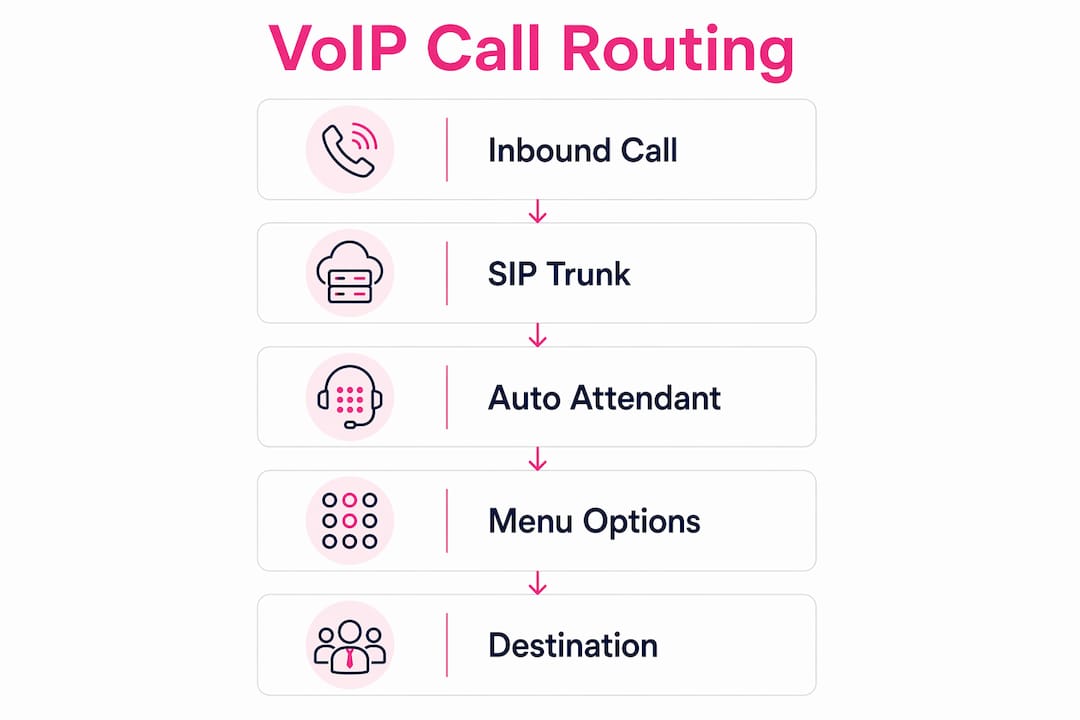
The mechanics are straightforward once you see the components. An inbound call arrives over a SIP trunk, which is the VoIP equivalent of a phone line, and lands on a hosted or cloud PBX platform. The auto attendant application intercepts the call before it reaches any extension, plays a pre-recorded greeting, and presents a menu.

Callers navigate that menu using DTMF tones (pressing 1, 2, 3 on their keypad) or, on more capable platforms, by speaking a department name. The system then routes the call to one of several destination types:
| Destination type | Typical use case |
|---|---|
| Internal extension | Direct to a named employee |
| Ring group / hunt group | Sales or support team, round-robin |
| Call queue | Queued wait with hold music |
| Mobile number | Remote worker or manager on the move |
| Sub-menu (nested AA) | Multi-department organisations |
| Voicemail | Out-of-hours or unanswered calls |
| Operator fallback (press 0) | Callers who prefer a human |
Time-of-day routing lets you define separate call flows for business hours, evenings, weekends, and public holidays. A caller ringing at 7 PM hears a different greeting and reaches voicemail or an on-call mobile rather than an empty desk. Overflow rules kick in when a queue exceeds a set wait time, redirecting callers to a secondary group or voicemail rather than leaving them hanging indefinitely.
Integration points sit at the routing layer. A CRM like Salesforce or HubSpot can receive a screen-pop when a call connects, matching the inbound number to a customer record. Helpdesk platforms such as Zendesk can auto-create a ticket from a voicemail. These integrations are not part of the auto attendant itself; they connect at the PBX or middleware layer and require API access from your chosen platform.
Pro Tip: Map your current call flows on paper before touching any system settings. A single A4 diagram of “who answers what and when” will save hours of rework during configuration.
Why businesses see real gains from an automated attendant
The most immediate benefit is consistency. Every caller, regardless of the time of day or how busy the office is, hears the same professional greeting. No more calls answered with a harried “hold on” or missed entirely because the receptionist stepped away.
- Reduced missed calls: Calls that previously rang out now reach a queue or voicemail, capturing leads that would otherwise be lost.
- After-hours coverage: Out-of-hours routing to voicemail or an on-call mobile means the business never goes dark.
- Lower staffing cost: A small office can present a multi-department front door without a dedicated receptionist.
- Faster routing to specialists: Callers self-select their department, cutting transfer time and reducing the number of times a caller is passed between staff.
- Brand consistency: The greeting, hold music, and menu language all reinforce the business’s identity on every call.
A well-configured auto attendant also reduces missed leads, improves caller consistency, and supports after-hours handling when queues and overflow routing are set up correctly. For a multi-site business, it creates a single-number front door that routes intelligently to whichever location or team is available.
The PSTN retirement deadline is not optional. BT’s full switch-off of the Public Switched Telephone Network is progressing region by region across the UK. Businesses still on analogue lines will lose service when their exchange is upgraded. Migrating to VoIP now, with a properly designed auto attendant, is operational continuity planning, not a luxury upgrade.
When an auto attendant is the right fit (and when it isn’t)
An auto attendant works well when your call routing needs are repeatable and predictable. If callers almost always want one of four or five destinations, a simple menu handles that cleanly. Multi-site businesses, professional services firms, and any organisation with distinct departments (sales, accounts, support, HR) are natural fits. So is the small office that currently relies on one person to answer and transfer every call.

It also suits businesses with strong out-of-hours demand. A property management company, a car dealership, or a clinic that receives calls outside staffed hours can route those calls to voicemail, an emergency mobile, or a recorded information message rather than losing them entirely. Essextelephonesystems works with exactly these kinds of businesses across Essex and London, and the pattern is consistent: the biggest gains come from organisations that previously had no structured after-hours routing at all.
Where it falls short is in high-empathy scenarios. A mental health service, a bereavement charity, or any context where the caller is in distress needs a human voice immediately. An auto attendant adds friction at exactly the wrong moment. Similarly, if your callers need to complete a transaction (check an account balance, confirm an appointment, pay a bill), a simple routing menu is not enough. That requires a full IVR with back-end integrations, which is a different and more complex build.
Pro Tip: Start with the simplest menu that covers 80% of your call types. You can always add a sub-menu or IVR module later. Launching with a six-option menu on day one is one of the most common mistakes, and callers notice.
UK setup and PSTN-to-VoIP migration checklist
Getting from a traditional phone system to a working VoIP auto attendant takes planning. The steps below are ordered by phase.
Phase 1: Pre-deployment (weeks 1–2)
- Map every current call flow: who answers, what they do with the call, and what happens out of hours.
- Decide on Direct Inward Dialling (DID) numbers: keep existing numbers via porting or add new ones.
- Confirm your internet connection can support VoIP. A leased line or fibre connection with a 4G/5G router as backup is the recommended baseline for business-grade reliability.
- Identify CRM or helpdesk integration requirements and confirm API availability.
- Check GDPR obligations: call recording requires caller notification; data must be stored within the UK or EEA.
Phase 2: Migration (weeks 3–5)
- Submit number porting requests. UK geographic numbers typically port within 5–10 working days; non-geographic numbers can take longer depending on the losing provider.
- Configure SIP trunks and test call quality (MOS score, jitter, packet loss) before going live.
- Build the auto attendant menus in the admin portal: create greetings, set call handling options, configure working hours, and assign numbers.
- Run a parallel period: keep the old system active while testing the new one with internal calls.
Phase 3: Testing and launch (week 6)
- Test every menu option end-to-end, including out-of-hours and the operator fallback (press 0).
- Test mobile overflow routing from a real mobile device on a different network.
- Conduct a caller experience audit: call in as a customer and time how long it takes to reach the right person.
- Train staff on transferring calls, checking voicemail, and updating greetings for holidays.
- Cut over and monitor call metrics for the first two weeks.
| Phase | Duration | Owner |
|---|---|---|
| Pre-deployment planning | 1–2 weeks | IT lead + telecoms supplier |
| Number porting and SIP testing | 2–3 weeks | Telecoms supplier |
| Parallel run and testing | 1 week | IT lead + key staff |
| Cutover and monitoring | Ongoing | IT lead |
Pro Tip: Never port your main number on a Friday. If something goes wrong, you want your supplier’s full support team available to fix it the same day.
Menu design best practices and ready-to-use scripts
The single biggest mistake in auto attendant design is offering too many choices. Callers presented with more than four options start to lose track of the first option by the time the fourth is read. Keep menus short, use plain language, and always offer a route to a human.
Single-level menu (small team, up to 10 staff)
Multi-level menu (larger organisation, multiple departments)
Out-of-hours script
Dos and don’ts:
- Do keep the greeting under 10 seconds before the first menu option.
- Do include “press 0 for an operator” on every level. An obvious operator fallback reduces the perceived loss of human touch and prevents caller frustration.
- Don’t use jargon or internal department names callers won’t recognise (“press 2 for the BDR team”).
- Don’t go deeper than two menu levels. Three levels in, abandonment rates climb sharply.
- Do measure routing accuracy and abandonment rate monthly and adjust menus when a particular option is consistently skipped or misrouted.
Pro Tip: Record your greeting with a professional voice artist or a high-quality text-to-speech tool. A tinny, rushed recording undermines the professional image the system is supposed to create.
What affects the cost of a VoIP auto attendant
There is no single price for a VoIP auto attendant because the cost depends on how many users, numbers, and features you need. The components to budget for are:
- Licence or seat fees: Most hosted PBX platforms charge per user per month. Auto attendant functionality is often included, but confirm this rather than assuming.
- DID/phone number costs: Each direct dial number carries a monthly rental fee. Porting existing numbers usually incurs a one-off porting charge per number.
- SIP trunking: Charged per channel (concurrent call) and per minute for outbound calls, or as a bundled minutes package.
- Installation and configuration: A managed supplier will charge for initial setup, menu design, and testing. This is worth paying for rather than attempting a DIY configuration on a live business number.
- Support SLA tier: Basic support (next business day) costs less than a premium tier with a four-hour response guarantee. For a business where phones are critical, the premium tier is usually worth it.
- Backup connectivity: A 4G/5G failover router adds a monthly cost but protects call availability if the primary internet connection drops.
- CRM/helpdesk integration: Custom API integrations carry a development cost and sometimes an ongoing connector fee.
| Cost component | Typical billing model |
|---|---|
| Hosted PBX licence | Per user, per month |
| DID numbers | Per number, per month + porting fee |
| SIP trunking | Per channel + per-minute or bundled |
| Installation and config | One-off project fee |
| Support SLA | Monthly or included in licence tier |
| Failover connectivity | Monthly (separate contract) |
When requesting quotes, ask suppliers to confirm: which features are included in the base licence, what the SLA response time is for a total outage, who is responsible for number porting, and whether configuration changes are included or billed separately.
How to choose a UK VoIP provider for your auto attendant
The technical capability of a platform matters less than you might expect. Most hosted PBX platforms handle the basics competently. What separates good suppliers from poor ones is support, porting experience, and how they handle problems.
Questions to ask in any vendor conversation:
- Is your support team UK-based, and what are the support hours?
- How many number ports have you completed in the last 12 months, and what is your average porting timeline?
- What is your SLA for a total loss of service, and what credits apply if you miss it?
- Where is call data and recording storage hosted? Is it UK or EEA-based?
- How do you handle GDPR compliance for call recordings?
- Can you provide a sample migration timeline and a named project contact?
- What API integrations are available for CRM and helpdesk platforms?
- How is failover handled if the primary internet connection drops?
Vendor capability checks worth running independently: ask for references from businesses of a similar size in your sector, check whether the supplier has experience with your specific number range (some non-geographic ranges have quirks during porting), and confirm that their platform supports the specific routing features your call flow requires before signing anything.
Pro Tip: Ask the supplier to walk you through a live demo of the admin portal before committing. A platform that takes 20 minutes to change a greeting is a platform you will dread updating.
How Essextelephonesystems implements VoIP auto attendants
Essextelephonesystems delivers hosted VoIP phone systems and managed migrations for businesses across Essex, London, and the South East. The service covers everything from initial call flow mapping through number porting, SIP trunk provisioning, auto attendant configuration, and post-launch support, all from a UK-based team.
The AIVoice platform extends the standard auto attendant with AI-powered reception capabilities: intelligent call handling, natural language routing, and automated responses for common enquiries. For businesses that want to move beyond a simple DTMF menu without the complexity of a full IVR build, it sits in a practical middle ground.
A typical implementation follows this pattern:
- Week 1: Call flow audit, number inventory, and connectivity assessment.
- Weeks 2–4: SIP trunk provisioning, menu design, and number porting submission.
- Week 5: Parallel testing, staff training, and caller experience audit.
- Week 6: Cutover, live monitoring, and post-launch support handover.
For sector-specific deployments, Essextelephonesystems has experience with clinic and healthcare call flows, property management routing, and high-volume sales environments where queue management and mobile overflow are critical.
Key takeaways
A VoIP auto attendant is the fastest way for a UK business to create consistent, professional call routing across all hours, and the PSTN retirement timeline makes migration a matter of operational continuity, not optional modernisation.
| Point | Details |
|---|---|
| Definition | A VoIP auto attendant answers and routes inbound calls automatically, without a human operator. |
| PSTN urgency | BT’s PSTN switch-off is progressing region by region; migrating now avoids a forced, rushed cutover later. |
| Menu design | Keep menus to four options or fewer per level, always include press 0 for an operator, and measure abandonment rate monthly. |
| Vendor selection | Prioritise UK-based support, documented porting experience, and a clear SLA for total outages over platform features alone. |
| Essextelephonesystems | Delivers managed VoIP and AIVoice auto attendant implementations for businesses across Essex, London, and the South East. |
The part most guides get wrong about auto attendants
Most articles about auto attendants focus almost entirely on features: how many menu levels, which platforms support speech recognition, whether you can route to a mobile. That is the wrong starting point.
The real question is what your callers experience. An auto attendant is the first thing a new customer hears. It sets the tone for the entire relationship before a single human being has spoken. A poorly designed menu, a greeting recorded on a laptop microphone, or a system that buries the operator option three levels deep does not just frustrate callers. It signals that the business does not care about the experience it creates.
The businesses that get the most value from their auto attendant treat it as a brand touchpoint, not a cost-cutting tool. They audit the caller journey the same way a good website team audits a user flow. They measure abandonment rates and routing accuracy. They update the greeting when something changes rather than leaving a message from three years ago playing to every new caller.
The PSTN retirement is forcing a lot of UK businesses into VoIP migration whether they planned for it or not. The ones who will come out ahead are the ones who use that forced change to design something intentional, rather than just replicating their old system on a new platform.
Cut call-handling costs without cutting corners
Essextelephonesystems gives businesses across Essex, London, and the South East a managed route to professional VoIP call handling, without long-term contracts or the cost of a dedicated receptionist. The VoIP service includes hosted PBX, auto attendant configuration, number porting, and UK-based support from a team that has handled migrations across sectors from property management to healthcare.
For businesses that want more than a basic routing menu, the AIVoice platform adds AI-powered reception and intelligent call handling, giving callers a natural, responsive experience without the overhead of a full IVR build. No overseas support queues, no generic setup guides, and no being handed off to a third party when something needs fixing.
To arrange a call flow audit or request a migration plan, get in touch with the Essextelephonesystems team directly. The audit is the right first step whether you are replacing an ageing PBX, preparing for PSTN retirement, or simply want to stop missing calls outside business hours.