
5 Clear Signs UK SMBs Need SD-WAN
19 September 2026
5 Clear Signs UK SMBs Need SD-WAN
For most small and medium businesses running two or more sites, SD-WAN for SMB deployments make sense: they raise reliability, speed up cloud application performance, and typically cut WAN costs compared with legacy MPLS. Single-site businesses with modest connectivity needs often don’t need it yet. The checklist and deployment steps below tell you which camp you’re in.
TL;DR:
- SD-WAN is most cost-effective and beneficial for SMBs with three or more sites, especially when workloads are cloud-first or reliant on VoIP and real-time applications.
- Deployment should begin with comprehensive network assessment, staged rollouts using zero-touch provisioning, and continuous monitoring to prevent misconfigurations and outages.
- Combining primary fiber with cellular backup provides resilience without the higher costs and complexity of dedicated MPLS circuits, which are only necessary for latency-sensitive legacy systems.
- Managed SD-WAN services offer support responsiveness, flexibility, and simplified administration, making them ideal for businesses without dedicated networking staff.
- Security should include replacing or integrating existing firewalls and considering SASE for advanced threat detection, especially in cloud-deploying or remote workforce environments.
Table of Contents
- What SD-WAN actually fixes for a small business
- When SD-WAN makes sense for your business
- Practical deployment steps for SMBs
- Costs and how to budget for SD-WAN
- Security: standalone SD-WAN, add-ons, and SASE
- Buying options: managed service versus self-managed
- Case studies: how SD-WAN plays out in real SMB environments
- Fitting SD-WAN around your existing infrastructure
- Choosing a vendor: what actually matters for an SMB
- Keeping SD-WAN running well after deployment
- Common pitfalls that derail SMB rollouts
- What I’ve learned installing these systems for local businesses
- Ready to move from research to a working network?
- Sources
- FAQ
What SD-WAN actually fixes for a small business
Most SMBs feel the pain before they know the cure. Calls drop mid-sentence during a Teams meeting. The cloud accounting package crawls at 9am when the whole office logs in. A single fibre fault in Colchester takes down the till system for four hours. SD-WAN (software-defined wide area networking) addresses these problems by combining multiple internet connections, such as fibre and 4G, into one intelligent network that routes traffic based on what it actually needs.
The practical wins break down like this:
- Failover in under a second. If your primary broadband drops, traffic shifts to a secondary line or cellular backup automatically, with no manual switch and minimal disruption.
- Application-aware routing. Voice and video traffic gets prioritised over background downloads, which directly improves VoIP and video call reliability across mixed fibre and cellular links.
- Local internet breakout. Cloud apps like Microsoft 365 or Salesforce reach the internet directly from each site instead of routing through a central data centre, cutting latency.
- Centralised management. IT staff or a managed provider control every site’s network policy from one dashboard, with new sites provisioned in days rather than weeks.
- Encrypted tunnels by default. Site-to-site traffic is encrypted out of the box, giving you a security baseline before you even consider add-ons.
On cost, SD-WAN typically runs 30 to 50% cheaper than MPLS for multi-site organisations, and most 2026 purchases now bundle in SASE-style security rather than treating it as a bolt-on. That combination, lower connectivity spend plus built-in resilience, is why SD-WAN has become the default recommendation for growing SMBs rather than a niche upgrade.
When SD-WAN makes sense for your business
Not every small business needs to rip out its current setup this quarter. Use this checklist to work out whether it’s time to brief suppliers or whether your existing network still has legs.
- You run three or more sites. SD-WAN’s ROI case gets stronger with scale. Below that, a dual-WAN firewall with cellular backup often does the job at a fraction of the complexity and cost.
- Your workloads are cloud-first. If most of your team lives in Microsoft 365, cloud CRM, or hosted VoIP, SD-WAN’s local breakout and application-aware routing will be noticeable within weeks.
- You depend on VoIP or a contact centre. Businesses where a dropped call means a lost customer benefit disproportionately from sub-second failover and voice prioritisation.
- You still have latency-sensitive legacy workloads. A handful of niche applications, high-frequency trading platforms, certain industrial control systems, genuinely need the sub-2 millisecond jitter that only dedicated MPLS circuits reliably deliver. SD-WAN handles roughly 95% of standard business traffic just as well as MPLS, but that remaining 5% is worth identifying before you switch everything over.
- You’ve got the staff, or the appetite for managed support. Self-managing SD-WAN needs someone who understands routing policy and security configuration. If that’s not you, a managed service closes the gap.
If you tick three or more of the first four boxes, it’s worth getting quotes. If you’re a single-site business with a stable connection and no VoIP headaches, hold off.
Practical deployment steps for SMBs
A rushed SD-WAN rollout causes more outages than it prevents. Here’s the sequence that avoids that.
- Assess current network performance. Log latency, jitter, and packet loss on existing circuits for at least a week, and list every business-critical application, VoIP, cloud ERP, EPOS, in order of sensitivity.
- Design the transport mix. Decide whether you need one fibre line plus 4G/5G backup, or two independent fibre circuits, and whether any single site genuinely justifies keeping an MPLS leg for latency-critical traffic.
- Choose edge devices and a delivery model. Pick hardware that matches your site count and decide upfront whether you want a fully managed service or an in-house team running the policy engine.
- Deploy using zero-touch provisioning. ZTP lets a non-technical person at each site plug in a pre-configured device while the network policy pushes down automatically. This is a major reason SD-WAN rolls out in days rather than the four to twelve weeks typically needed to provision a new MPLS circuit. Run a staged cutover, one site or one traffic type at a time, rather than flipping every location simultaneously.
- Set monitoring and KPIs. Track uptime, latency per application, and failover event frequency from day one so you can spot a badly configured policy before it becomes a pattern.
Pro Tip: Run your first cutover on your least critical site, not your head office. You’ll catch configuration mistakes without a director standing over your shoulder asking why the phones are down.
Costs and how to budget for SD-WAN
Your SD-WAN bill breaks into four parts: the underlay circuits (fibre, broadband, cellular), edge hardware or a hardware rental fee, software licensing per site, and, if you go managed, a monthly management fee.
- Underlay circuits are usually your biggest recurring cost, and combining a primary fibre line with a 4G/5G backup router covers most resilience needs without paying for a second full-fibre circuit.
- Hardware and licensing scale with site count, so a three-site business pays proportionally less per site than a ten-site one due to volume pricing.
- Management fees apply only if you choose a managed or co-managed service, but they replace the need for in-house networking specialists.
European SMBs migrating from MPLS to SD-WAN commonly report TCO reductions of 30 to 50%, largely because broadband and cellular underlay circuits cost a fraction of dedicated MPLS bandwidth. A managed service shifts most of this spend from capital expense to predictable monthly operating cost, which is easier to budget around than an unpredictable capital outlay every few years. Before signing anything, ask vendors directly what happens beyond your contracted data allowance, whether SLA credits are automatic or something you have to chase, and what a mid-contract site addition actually costs.
Security: standalone SD-WAN, add-ons, and SASE
Encryption comes standard with SD-WAN. What doesn’t always come standard is everything else you’d associate with a proper security posture.
Standalone SD-WAN encrypts traffic by default but doesn’t necessarily include deep packet inspection or identity-based access control. SASE (Secure Access Service Edge) integrates SD-WAN with a firewall-as-a-service, secure web gateway, and zero trust network access, giving you a genuinely complete security layer rather than encrypted pipes and hope.
- SASE earns its extra cost if you’re cloud-first, have a remote or hybrid workforce, or face regulatory requirements around data handling.
- If you stick with standalone SD-WAN, plan to add a next-generation firewall, a secure web gateway, and run regular security audits to close the gaps SASE would otherwise handle.
- Zero trust access matters more than most SMBs realise once staff work from home or client sites; a secure remote access approach built on ZTNA verifies identity per session rather than trusting anyone already inside the network perimeter.
- Ask suppliers directly about threat detection capability, how policy changes get orchestrated across sites, and what their incident response process actually looks like at 2am on a Saturday.
Buying options: managed service versus self-managed
Your team’s networking depth should drive this decision more than price alone.
- Fully managed suits businesses with no dedicated IT networking staff. You get 24/7 monitoring, proactive fault resolution, and someone else owns the 2am alert.
- Co-managed works if you have an IT generalist who can handle day-to-day tickets but wants a specialist backstop for configuration changes and security policy.
- Self-managed only makes sense if you already run an in-house team comfortable with routing, firewall rules, and traffic policy, and you have the time to keep both current.
Whichever route you pick, pin down response times in writing, ask whether local site visits are included or billed separately, and insist on a pilot before a multi-site commitment. Treat vendor proposals with suspicion if a carrier’s “SD-WAN” quote looks suspiciously like their old MPLS pricing with a new label; that’s usually a repackaged product rather than a genuine architecture change, and it’s worth comparing against an independent or carrier-agnostic vendor before signing.
Case studies: how SD-WAN plays out in real SMB environments
The pattern across successful SMB rollouts tends to repeat itself. A retail chain with four or five branches replaces a single fibre line per site with a fibre-plus-4G combination, and the first thing that improves isn’t cost, it’s the till system staying online during a local outage. A professional services firm running hosted VoIP across two offices finds that call quality complaints drop sharply once application-aware routing prioritises voice traffic ahead of routine file syncing.
The businesses that get the most out of SD-WAN share a common trait: they didn’t try to solve every problem in the first phase. One food distribution business with six depots, a scenario that maps closely onto the multi-site, cloud-dependent profile that benefits most, started with cellular failover at its two least reliable sites before extending the rollout. That staged approach caught a misconfigured routing policy early, at a site where a fault meant a delayed delivery rather than a company-wide outage.
Where implementations stumble, it’s rarely the technology. It’s usually a business that under-invested in the assessment phase, deployed everywhere at once, and only discovered a policy conflict once it was affecting every site simultaneously. The lesson from businesses that got this right isn’t exotic: audit first, pilot on a forgiving site, then scale once the configuration is proven.
Fitting SD-WAN around your existing infrastructure
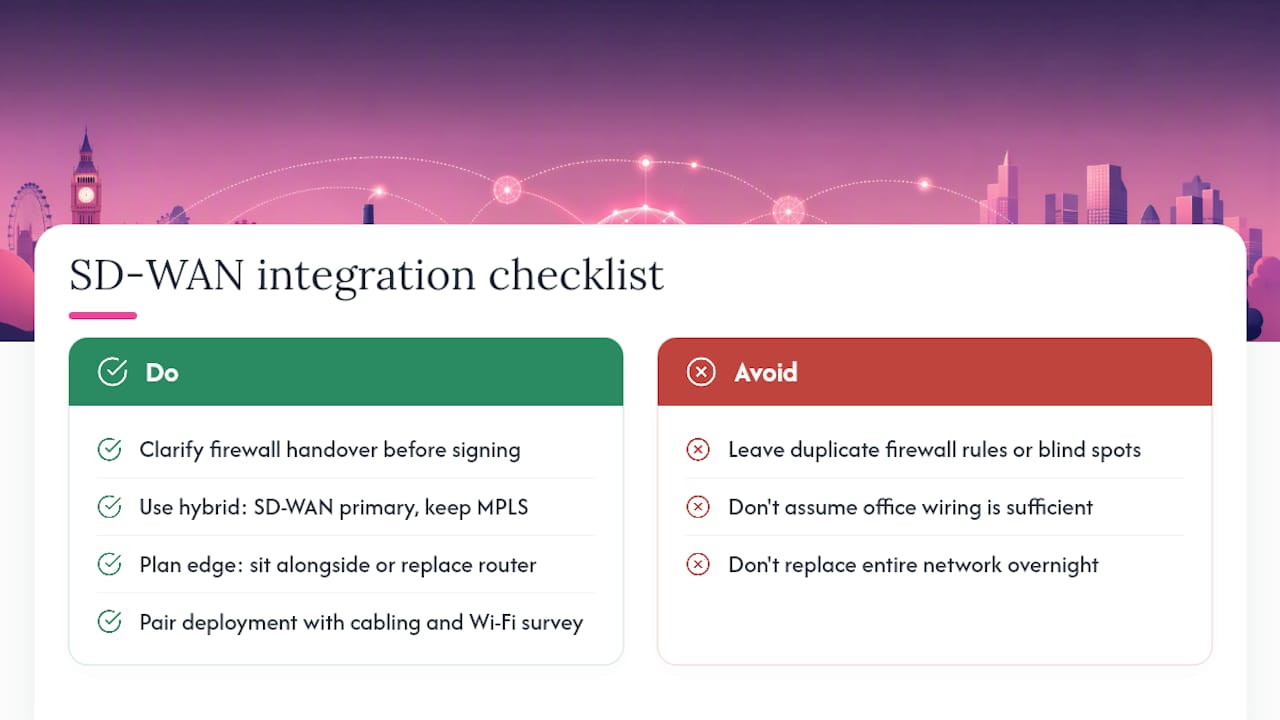
Few SMBs are building a network from scratch. Most already have a mix of switches, firewalls, on-premise servers, and possibly an ageing MPLS contract with time left to run, and SD-WAN needs to sit alongside all of it rather than replace it overnight.
The most common integration question is what happens to existing firewalls. In most SMB deployments, the SD-WAN edge device sits alongside or replaces the router function while your existing firewall policy either migrates into the SD-WAN platform’s own security stack or continues operating separately behind it. Get clarity on this before signing anything, because a poorly planned handover is where duplicate rules and blind spots creep in.
Legacy on-premise applications, an old practice management system, a locally hosted database, that weren’t built with cloud routing in mind sometimes need specific traffic rules to keep working properly across the new architecture. This is exactly where the hybrid approach earns its keep: run SD-WAN as your primary overlay for cloud and general traffic, and keep a single MPLS or dedicated circuit for the one legacy system that genuinely can’t tolerate variable latency.
Cabling and physical infrastructure matter more than most SMB buyers expect. If your office wiring is patchy or your access points are poorly placed, even a perfectly configured SD-WAN deployment will underperform at the point where traffic actually reaches a laptop or till terminal. It’s worth pairing a network upgrade with a proper cabling review and a wifi survey rather than assuming the fix stops at the router.
Choosing a vendor: what actually matters for an SMB
Enterprise vendor scorecards are largely useless for a 20-person business, because half the criteria (global points-of-presence, six-figure minimum spend, dedicated account teams) simply don’t apply at SMB scale. Focus instead on criteria that map to how a small business actually operates.
Scalability without re-architecture matters more than raw feature count. Ask whether adding a fourth or fifth site means a straightforward policy push or a partial network redesign. Support responsiveness matters more than support hours on paper; a vendor advertising 24/7 support with a four-hour response window isn’t much use if your till system is down during Saturday trading. Local presence is worth asking about directly, since a UK-based support team resolving issues in your own time zone beats a follow-the-sun model routed through three countries before someone picks up the phone.
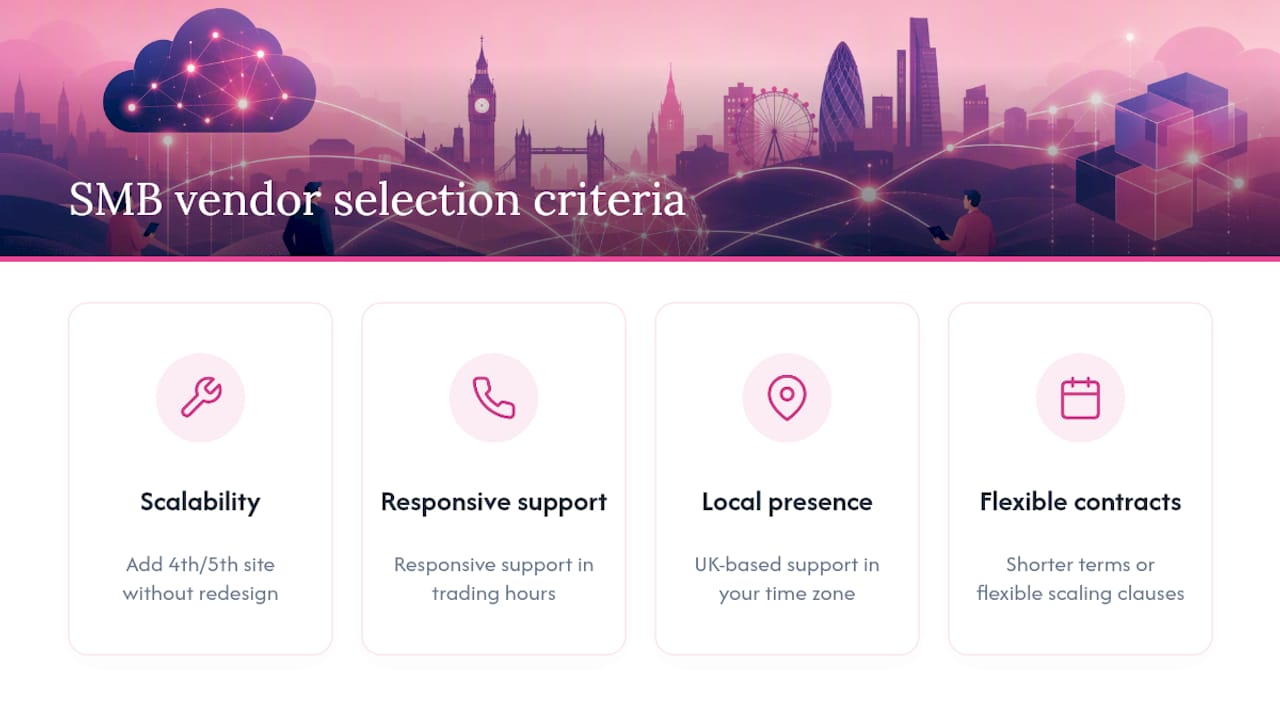
Contract flexibility deserves scrutiny too. Long lock-in periods make sense for large enterprises amortising a big capital outlay, but they work against SMBs whose headcount and site count can shift within a year. Look for providers willing to offer shorter terms or flexible scaling clauses rather than locking you into a three-year commitment based on today’s footprint.
Finally, ask for references from businesses of a similar size, not enterprise logos on a slide deck. A vendor that primarily serves large corporates may treat your five-site rollout as an afterthought compared with their headline accounts.
Keeping SD-WAN running well after deployment
Installation day is the easy part. What separates a network that stays reliable for years from one that quietly degrades is what happens in the months afterward.
Set up dashboards that track latency, jitter, and packet loss per application, not just per site, since a site can show healthy overall bandwidth while a single critical app still suffers. Review failover event logs monthly. A backup circuit that keeps kicking in more than expected usually points to a primary line issue worth escalating with your provider rather than something SD-WAN itself is failing to handle.
Revisit your routing policies every quarter, particularly if you’ve added new cloud applications or changed how staff work. A policy tuned for the applications you ran at launch quietly becomes stale as your software stack evolves, and stale routing rules are one of the most common causes of “the network used to be faster” complaints six months into a deployment.
If you’ve gone with a managed service, use your monthly or quarterly review calls properly. Ask for the actual uptime and failover figures rather than accepting a generic “all systems normal” summary, and push back if response times have been slipping. If you’re self-managing, build alerting into your monitoring platform so problems surface before a user reports them, because by the time a member of staff complains about a slow cloud app, it’s usually been degraded for hours.
Common pitfalls that derail SMB rollouts
The mistakes that sink SD-WAN projects for small businesses are rarely about the technology itself.
The most frequent one is skipping the assessment phase entirely. A business signs a contract based on a vendor’s sales pitch without ever logging its actual latency, jitter, or application usage patterns, then discovers post-deployment that a critical application behaves unpredictably under the new routing policy. A week of baseline monitoring before you sign anything would have caught it.
The second is underestimating the change to existing firewall rules and VLANs. Teams that treat SD-WAN as a drop-in router replacement, rather than reviewing how it interacts with existing network segmentation, end up with duplicated security rules or, worse, gaps neither the old firewall nor the new platform is actually covering.
The third is going all-in on day one. A simultaneous cutover across every site multiplies the blast radius of any misconfiguration, turning a single bad policy into a company-wide outage instead of a contained one-site problem.
The fourth, and perhaps the costliest long-term, is signing a carrier-branded SD-WAN contract that’s really just repackaged MPLS pricing without genuine architectural change. Comparing quotes from an independent or vendor-agnostic provider against a carrier’s own offering usually exposes this quickly.
Each of these is avoidable with the same discipline: assess before you commit, pilot before you scale, and read the contract for what it actually delivers rather than what the sales deck implies.
What I’ve learned installing these systems for local businesses
The mistake I see most often isn’t technical, it’s sequencing. Businesses get excited about the failover demo and skip the boring assessment week, then wonder why a critical app behaves oddly three weeks in. Slow down at the start and you save weeks of firefighting later.
The other thing worth saying plainly: flexibility matters more than SMB owners expect going in. We build our own contracts around no long-term lock-in and UK-based support precisely because a network that suits your business today won’t suit it in eighteen months, and you shouldn’t be penalised for growing.
If you’re unsure which camp your business falls into, get a proper site assessment before you brief anyone on pricing.
— Paul
Ready to move from research to a working network?
If the checklist above points you towards SD-WAN, the underlay connectivity you choose matters as much as the platform itself. Essextelephonesystems supplies the business broadband and leased line options that form the foundation of a resilient SD-WAN setup, alongside 4G and 5G routers for cellular failover and network cabling installation for sites that need physical infrastructure work before cutover. Every service comes without long-term lock-in and with UK-based support, so a network that fits your business today can flex as it grows. Get in touch for a site assessment before you brief anyone else.
Sources
- Benefits of SD‑WAN — Fortinet
- SD‑WAN managed services: a UK business transformation guide — F1 Group
FAQ
What is the purpose of SD-WAN?
SD-WAN combines multiple internet connections, such as fibre and 4G, into one intelligently managed network that routes traffic based on application needs and switches automatically if a link fails. Its core purpose for SMBs is improving reliability and cloud application performance while typically cutting WAN costs compared with traditional MPLS circuits.
Is SD-WAN obsolete?
No, SD-WAN is not obsolete. It’s increasingly bundled with security as SASE rather than sold standalone, but the underlying technology, intelligent multi-path routing and centralised management, remains the standard approach for multi-site businesses moving away from MPLS.
Which is better, SD-WAN or MPLS?
SD-WAN handles roughly 95% of standard business workloads as well as MPLS, usually at 30 to 50% lower cost, with faster deployment through zero-touch provisioning. MPLS still wins for a narrow set of workloads needing sub-2 millisecond jitter, which is why many businesses run a hybrid of both rather than choosing one exclusively.
What is SD-WAN versus a traditional WAN?
A traditional WAN typically relies on a single connection type, often MPLS, with routing decisions made by fixed hardware configuration rather than dynamic policy. SD-WAN uses software to manage multiple connection types simultaneously, applying application-aware routing and automatic failover that a traditional WAN can’t replicate without manual intervention.
How much does SD-WAN cost for a small business?
Costs vary by site count and whether you choose managed or self-managed delivery, but SD-WAN commonly delivers TCO reductions of 30 to 50% compared with equivalent MPLS connectivity. A managed service converts most of that spend into a predictable monthly fee rather than a large upfront capital cost.