
5 Checks Security Teams Need for Multi Site Cloud Access Control
13 September 2026
5 Checks Security Teams Need for Multi Site Cloud Access Control
Cloud access control centralises your access policies in a web-hosted platform, letting security teams manage doors, users and audits for every site from a single console. The main decision isn’t whether to move to the cloud, but which architecture you’re buying: cloud-native platforms built for distributed estates, or cloud-enabled legacy systems wearing a thin web interface. Get that distinction wrong and multi-site consistency, the whole point of going cloud quietly falls apart.
TL;DR:
- Cloud-native platforms offer centralized updates, synchronized user records, and easier scalability compared to cloud-enabled or pseudo-cloud systems.
- Offline resilience depends on edge caching policies and proper fail-secure or fail-safe configurations, which should be tested during vendor evaluation.
- Integration with identity providers, video management, SIEM, and visitor platforms via APIs is crucial for reducing management overhead and enhancing security.
- Total cost of ownership includes subscription fees, existing hardware, installation, and long-term efficiency gains, with payback heavily influenced by the number of sites involved.
- A comprehensive site survey and quality network setup, including redundancy and proper firewalls, are essential for successful cloud access control deployment.
Table of Contents
- What is cloud access control and how does it differ from on-premises systems?
- Cloud-native vs cloud-enabled: why the label on the box lies
- What features actually matter for multi-site access control?
- How do mobile credentials, MFA and biometrics fit together?
- Multi-site management and PIAM: one identity, many doors
- Why API-first integration should top your shortlist
- What happens when the internet connection fails?
- What does cloud access control cost across multiple sites?
- How do you choose a cloud access control platform?
- Practical deployment notes and supplier considerations
- Where physical access control is heading for multi-site operators
- An adjacent way to reduce deployment risk
- Sources
- FAQ
What is cloud access control and how does it differ from on-premises systems?
On-premises access control keeps everything, servers, databases, permission logic, on a box in a cupboard at each site. If you run twelve buildings, you effectively run twelve separate security systems that need patching, backing up and babysitting individually. Cloud access control moves that system-of-record off-site into a hosted platform, giving administrators one login and one unified view of every door, alert and user across all locations, according to Brivo.
The financial shift matters as much as the operational one. Instead of buying servers and paying for maintenance contracts (capital expenditure), you pay a recurring subscription (operating expenditure), which usually includes updates and support.
That said, cloud isn’t automatically right for every estate:
- Sites with strict data-residency rules or regulatory isolation requirements may need to keep records local
- A single standalone building with no plans to expand rarely needs the overhead of a multi-site cloud platform
- Extremely remote sites with unreliable connectivity need a hybrid approach with strong edge resilience, not blind faith in the cloud link
Cloud-native vs cloud-enabled: why the label on the box lies
This is the distinction vendors would rather you didn’t scrutinise too closely. Cloud-native platforms are built from the ground up with a central identity and policy store, microservices architecture, and an API-first design, so every site reads from the same live source of truth. Cloud-enabled systems take an existing on-premises server product and bolt a cloud dashboard on top, according to Nuveq.
The difference shows up the moment something goes wrong or you try to scale:
- Upgrades: cloud-native platforms push updates centrally and continuously; cloud-enabled systems often need scheduled maintenance windows per site
- Records: cloud-native holds one identity per user across all locations; cloud-enabled frequently keeps a separate local database per site, which drifts out of sync
- Vendor lock-in: proprietary on-premises hardware behind a cloud-enabled wrapper is harder to migrate away from than an open, API-first cloud-native system
- Scalability: adding a fortieth site to a cloud-native platform is a configuration task; doing it on cloud-enabled infrastructure can mean another local server deployment
A related trap is what’s sometimes called pseudo-cloud: a legacy install simply rehosted per customer in someone else’s data centre. It looks cloud-based on the sales sheet but keeps most of the limitations of on-premises software, according to Nedap Security.
What features actually matter for multi-site access control?
Plenty of platforms claim to be enterprise-ready. Fewer actually deliver the capabilities that reduce admin overhead and shorten incident response across a distributed estate:
- Central policy management with role-based access control so a change to a job role updates permissions at every site instantly, not one location at a time.
- Real-time alerts and unified audit logs that give compliance teams one exportable record instead of reconciling twelve separate log formats.
- Automated visitor and contractor workflows, including time-limited credentials that expire without manual intervention.
- Credential lifecycle automation tied to HR events, so leavers lose access the moment their employment ends, everywhere, not just at their home site.
- Video and alarm correlation, pairing a forced-door alert with the camera feed from that exact door automatically. Al Barakah Holding’s centralised deployment used exactly this kind of correlation to cut incident investigation time, moving resolution from several hours to significantly less time, according to IDCUBE.
How do mobile credentials, MFA and biometrics fit together?
Physical access control still runs on the same three authentication factors as any digital login: something you know, something you have, and something you are, according to Avigilon. Mobile credentials sit in the “something you have” category but behave very differently from a plastic card. Lose a phone and you revoke the credential instantly from the console; lose a card and someone has to physically collect or deactivate it.
Biometrics (fingerprint, face, iris) offer strong verification but come with genuine hardware and maintenance costs, and they raise separate privacy questions that plastic cards don’t.
For a multi-site estate, a sensible pattern is:
- Mobile credential or card for general door access
- Biometric or mobile plus PIN for server rooms, comms cabinets, and other high-value areas
- Full MFA, credential plus a second factor, for any administrator logging into the access control console itself, since that account can rewrite every site’s permissions
Multi-site management and PIAM: one identity, many doors
Physical identity and access management, PIAM, treats every person as a single identity record with permissions that apply consistently regardless of which site they walk into. That single source of truth is what stops the classic multi-site failure mode: someone terminated at head office still able to badge into a warehouse three postcodes away because nobody remembered to update that site’s separate list.
Practical PIAM setups typically include:
- Direct integration with HR systems and directories like Azure AD, so starters and leavers trigger automatic provisioning and deprovisioning
- Central governance with defined exceptions for site-specific needs, a manufacturing floor requiring extra clearance, say, without breaking the overall policy model
- Full audit trails showing exactly who granted which access, and when
RightCrowd’s work scaling secure access across a large number of global data centres shows what this looks like at real scale: automated provisioning and consistent policy enforcement across a genuinely large, geographically scattered estate, per RightCrowd’s case study. For large estates, PIAM functions less like a security feature and more like an identity governance layer, which is why procurement teams increasingly treat it as an identity project as much as a physical security one.
Why API-first integration should top your shortlist
An access control platform that can’t talk to your other systems just creates another silo to manage. API-first platforms automate the handoffs that otherwise eat administrator time: a new starter added in HR software should appear with correct door access the same day, with no manual data entry at either end.
When evaluating integration depth, prioritise:
- Identity providers like Azure AD or Okta, for single sign-on and SCIM-based user provisioning
- Video management systems, so access events and camera footage sit in one timeline rather than two separate tools you have to cross-reference manually
- SIEM platforms, feeding access events into your broader security monitoring
- Visitor management, so front-desk sign-ins generate proper temporary credentials rather than a paper logbook nobody audits
Correlating access control with video intelligence is where the real payoff shows up. A CCTV integration layered onto your access platform means an alarm on a side door pulls up the relevant footage automatically, rather than security staff scrubbing through hours of unrelated recordings.
What happens when the internet connection fails?
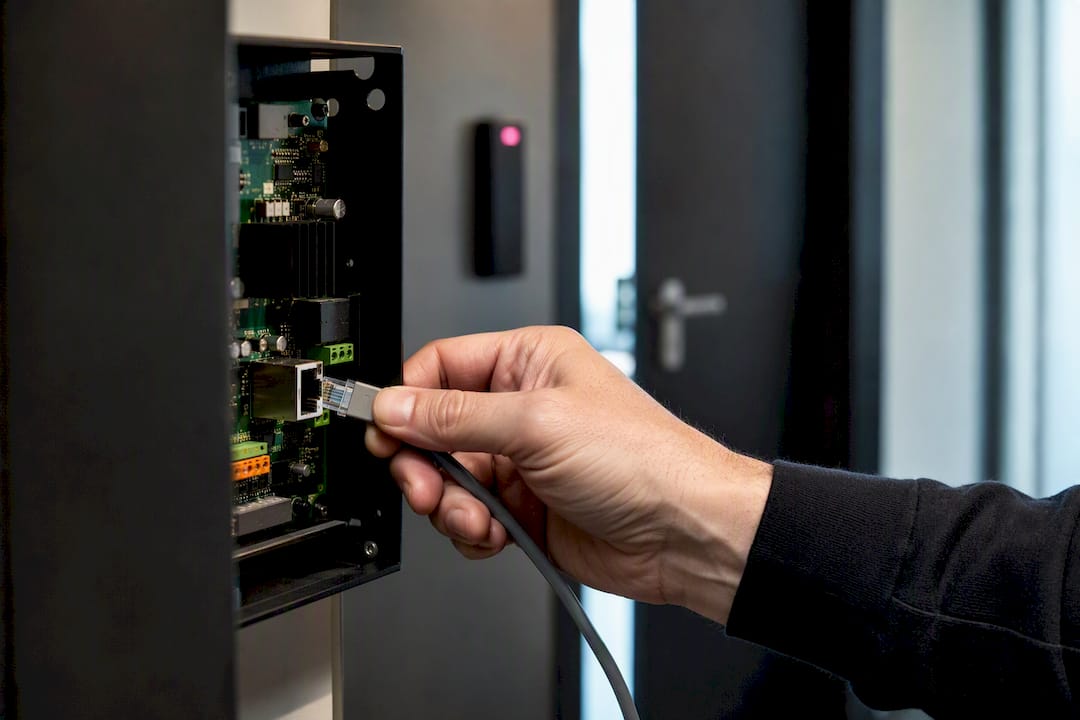
This is the question too many buyers forget to ask until the outage happens. Well-designed systems push intelligence to the edge: controllers and readers cache policies locally and buffer events, so doors keep working correctly even when the connection to the cloud platform drops, according to Nuveq. ONVIF’s own PACS architecture guidance backs this as a baseline expectation, specifying that devices should support offline event handling so doors continue functioning without a live link to the management system, per ONVIF’s architecture documentation.
You need to know, precisely, whether each door is fail-secure (locks on power loss) or fail-safe (unlocks on power loss), and confirm that matches fire and life-safety requirements for that specific door.
Pro Tip: During vendor evaluation, physically pull the network cable at a test site and watch what happens. A door that keeps functioning and correctly reconciles its event log once reconnected has passed the only test that matters.
What does cloud access control cost across multiple sites?
Total cost of ownership has several moving parts, and vendors rarely volunteer all of them upfront:
- Subscription fees replace the old perpetual licence plus annual maintenance model, converting a large upfront cost into predictable monthly spend, which is exactly the shift that drives much of the ROI case for cloud-native deployments
- Hardware and cabling for readers, controllers and door hardware at each site, which vary hugely depending on how much existing infrastructure you can reuse
- Installation and network setup, often the most underestimated line item on the whole project
- Ongoing efficiency gains, fewer site visits, automated onboarding, centralised troubleshooting, which is where most of the long-term payback actually comes from rather than the software licence itself
Payback horizons shift depending on how many sites you’re running, how much you can integrate with existing HR and identity systems, and whether you can reuse door hardware rather than replacing it outright.
How do you choose a cloud access control platform?
Work through this sequence before signing anything:
- Confirm where the system of record actually lives and how policy changes propagate to every site, near-zero latency for a credential revocation is non-negotiable in a high-security environment.
- Demand proof of API maturity: ask for a working SSO/SCIM integration demo, not a slide describing one.
- Test offline behaviour directly: disconnect a test site and measure how it fails and how cleanly it reconciles afterwards.
- Check certifications and data residency: ask specifically about ISO/IEC alignment, SOC compliance, and where customer data is physically stored.
- Review audit log fidelity: can it produce a clean, exportable record for a compliance audit without manual reformatting?
Watch for these red flags during vendor demos: vague answers about patching cadence, no clear edge-caching story, and a limited or closed integration catalogue.
| Checklist item | What to verify | Red flag |
|---|---|---|
| System of record | Central policy store with real-time propagation | Local per-site databases marketed as “cloud” |
| Offline resilience | Edge caching, documented fail-secure/fail-safe behaviour | No answer, or “it just works” |
| Integrations | Working SSO/SCIM, VMS, SIEM demos | Closed API or partner-only integrations |
| Certifications | ISO/IEC alignment, SOC compliance, stated data residency | Unclear or evasive on data location |
For a deeper look at what SaaS vendors should be able to demonstrate around security posture, Quantiflow’s guide on construction SaaS security sets out the kind of vendor accountability questions that translate well to access control procurement too.
Practical deployment notes and supplier considerations
Software decisions are only half the project. Cloud access control depends entirely on the network underneath it: readers and controllers need reliable, correctly configured connectivity at every site, and that’s an infrastructure job, not a software one. Specialist providers offer network cabling, leased lines and smart door and gate entry installation, laying the groundwork that determines whether a cloud platform performs as promised on site.
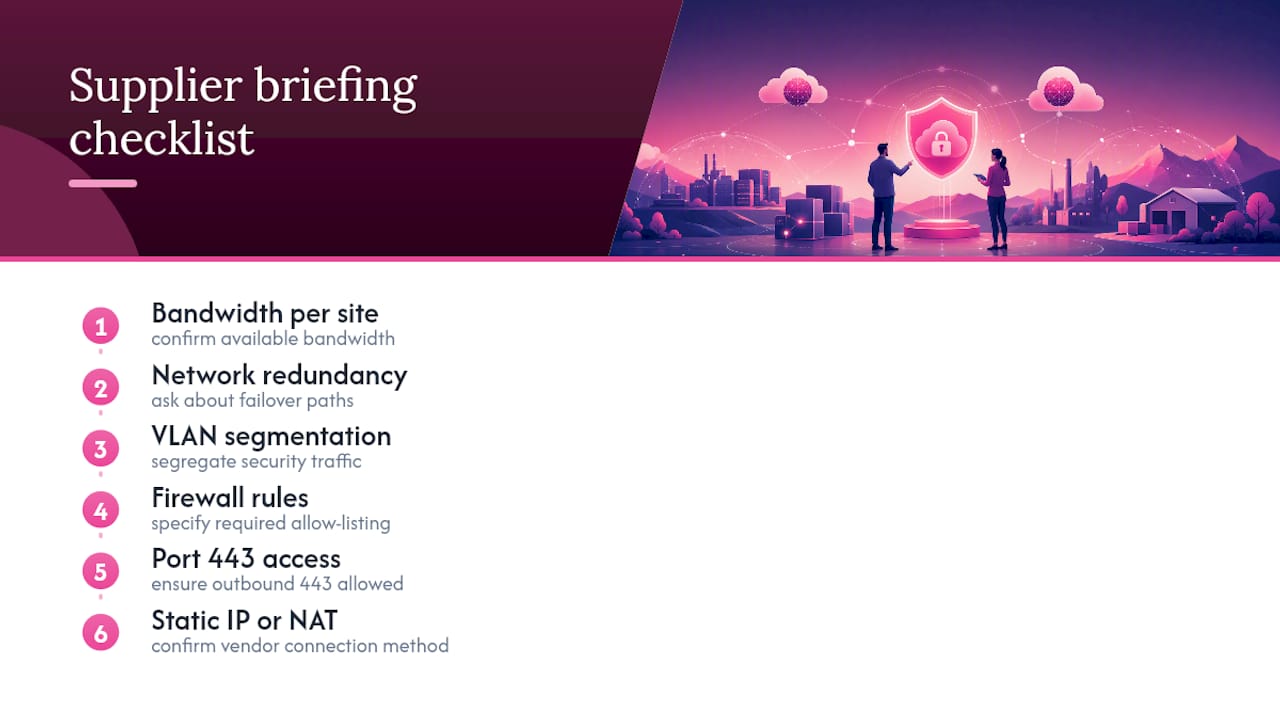
When briefing a connectivity installer for an access control rollout, ask about available bandwidth per site, network redundancy, VLAN segmentation for security traffic, firewall rules and port 443 access, and whether static IP or NAT configuration is required for the access control vendor’s cloud connection. UK-based support matters here too: a fault on a remote door controller resolved same-day by a local technician looks very different from a ticket sitting in a queue for a supplier three time zones away.
Where physical access control is heading for multi-site operators
Physical and digital identity will keep converging, with PIAM becoming the default governance layer rather than a niche add-on for large estates. API openness will increasingly separate serious platforms from cloud-enabled pretenders at the procurement stage. The winning approach isn’t total centralisation. It’s central policy with enough local flexibility that individual sites can still operate sensibly when the network, inevitably, has a bad day.
— Paul
An adjacent way to reduce deployment risk
A practical alternative to hoping your existing office wiring will cope with a cloud access control rollout is to conduct a proper site survey that catches bandwidth gaps, cabling weak points and redundancy issues before they cause downtime.
Support for projects includes professional network cabling, resilient leased lines for sites that can’t afford connectivity gaps, business-grade broadband, and smart door and gate entry installation, potentially backed by UK-based support that resolves faults quickly rather than leaving a door controller offline for days. Getting the underlying network right the first time is what stops a cloud access control project from becoming a string of avoidable outages. If you’re planning a multi-site rollout, consider arranging a site survey or technical consultation before you commit to hardware.
Sources
- Multi-location security management | Brivo
- Cloud-enabled vs cloud-native access control systems | Nuveq
- ONVIF PACS architecture and design considerations
- Centralised access control for Al Barakah Holding | IDCUBE
FAQ
What are cloud access controls?
Cloud access controls are web-hosted systems that manage door permissions, user credentials and audit logs centrally, letting administrators oversee multiple sites from one console instead of separate on-site servers, per Brivo.
What are the best cloud-based access control systems for multi-site organisations?
The strongest options are cloud-native platforms with a central identity store, API-first integrations and edge caching for offline resilience, rather than cloud-enabled systems that simply add a web dashboard to legacy on-premises hardware, according to Nuveq.
What are the four types of access control?
The commonly cited models are discretionary, mandatory, role-based and rule-based access control, though many cloud platforms today combine role-based control with rule-based conditions like time or location for finer-grained policy enforcement.
What are the four types of cloud security relevant to access control?
For physical access control specifically, the practical categories are identity and authentication security, network and data-transmission security, edge device and offline resilience, and audit and compliance logging, each addressing a different failure point in a cloud-hosted system.
How does cloud access control handle a lost internet connection?
Well-designed systems cache policies and buffer events locally at the controller or reader, so doors keep operating correctly during an outage and reconcile automatically once connectivity returns, an approach backed by ONVIF’s PACS guidance.